Efficiently rename devices in Intune with PowerShell and Graph API
A common operational requirement in Intune is to rename devices at scale, yet Intune does not provide a native bulk rename capability for existing devices. This post introduces a practical, production-ready PowerShell solution that uses Microsoft Graph to safely and consistently rename Intune-managed devices.
The script is designed for real-world tenant usage, focusing on correctness, auditability, and control.
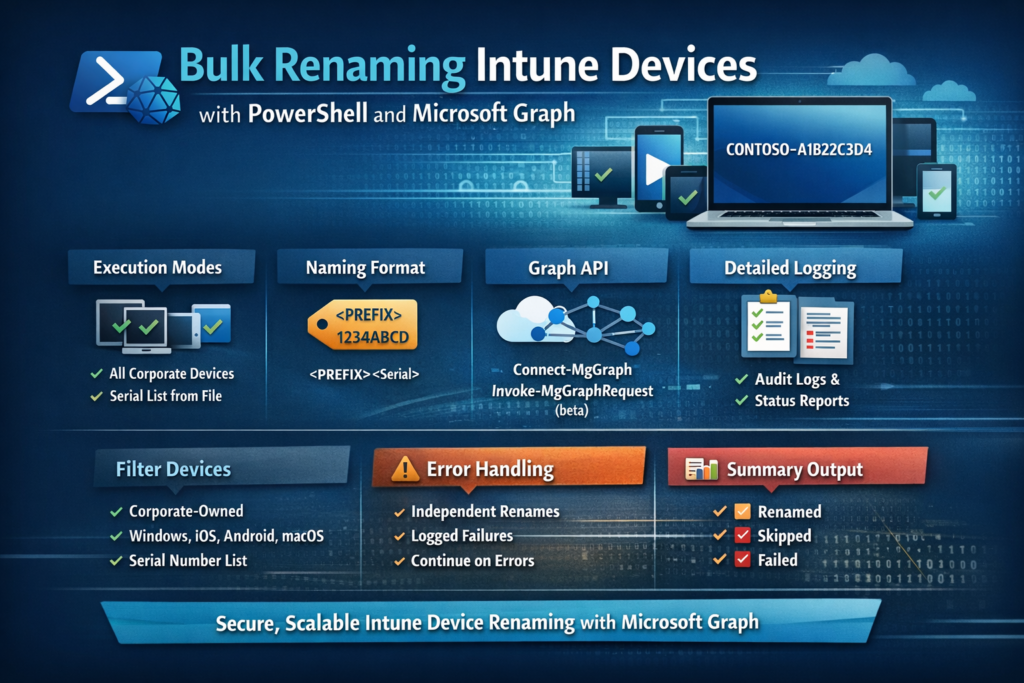
Table of Contents
Why Bulk Rename of Intune devices Matters
Consistent device naming improves:
- Device identification during support incidents
- Inventory and asset tracking
- Reporting and automation
- Cross-team communication
Manual renaming does not scale and introduces human error.
As described in a previous post here, the renaming can be also performed using a Remediations script.
Automation via Microsoft Graph is probably the most reliable approach.
Script Overview
The Intune Device Bulk Renaming Tool is an interactive PowerShell script that:
- Connects to Microsoft Graph
- Collects execution parameters via prompts
- Identifies target devices
- Renames devices using a deterministic naming pattern
- Logs every action
The script is safe to run in large tenants and does not stop on individual failures.
Execution Modes
The script supports two controlled execution modes.
1. All Corporate Devices
- Targets corporate-owned Intune devices only
- Optional platform filter:
- Windows
- Android
- iOS
- macOS
- Useful for tenant-wide naming standardization
2. Specific Devices from a File
- Reads serial numbers from a
.txtfile - One serial number per line
- Renames only the devices you explicitly provide
- Ideal for staged rollouts or exception handling
Interactive User Input
The script guides the admin through:
- Execution mode selection
- Naming prefix definition
- Optional platform filtering
- Serial number file selection (if applicable)
This avoids hardcoding values and reduces execution mistakes.
Naming Logic
Device names are generated using the following format:
<PREFIX>-<Last 8 characters of Serial Number>
Example:
CONTOSO-A1B2C3D4
Design benefits:
- Serial numbers ensure uniqueness
- Short, readable device names
- Predictable naming across platforms
Devices are skipped if:
- No serial number is available
- The current device name already matches the expected name
Microsoft Graph Rename Operation
Renaming is performed using the Graph beta endpoint:
POST /deviceManagement/managedDevices/{intune_id}/setDeviceName
Key implementation details:
- Variables are reinitialized for every device
- Each rename request is isolated
- Failures do not impact subsequent devices
This prevents name reuse or cross-device issues during bulk operations.
Filtering Logic
Device discovery supports:
- Corporate-owned devices (
managedDeviceOwnerType eq 'Company') - Platform filtering via
operatingSystem - Optional serial-based targeting
Filtering is applied before any rename action is attempted.
Logging and Auditing
The script generates a timestamped .log file containing:
- Timestamp
- Device ID
- Old device name
- New device name
- Status (Success / Skipped / Failed)
- Error message (if applicable)
This provides:
- Full traceability
- Post-execution auditing
- Easier troubleshooting
No actions are performed silently.
Error Handling Strategy
- Each device is processed independently
- Graph API errors are captured and logged
- The script continues execution even if a rename fails
- Final results reflect all outcomes accurately
This makes the script safe for unattended or large-scale use.
Real-Time Feedback
During execution, the admin gets:
- A progress bar showing completion status
- A final summary with:
- Total devices processed
- Successfully renamed
- Skipped
- Failed
This avoids guesswork and confirms execution results immediately.
Permissions Required
The script requires the following Microsoft Graph permissions:
DeviceManagementManagedDevices.ReadWrite.AllDirectory.Read.All
Authentication is handled via Connect-MgGraph, and the script validates an active session before proceeding.
The Script
You can find the script in my GitHub repo too.
Always validate the script on a small subset of devices before applying changes across the entire fleet.
<#
Intune Device Bulk Renaming Tool
- Uses Connect-MgGraph and Invoke-MgGraphRequest (beta) to rename devices.
- Interactive prompts gather scope (all corporate devices or serial list), naming prefix, and optional platform filter.
- Default tenant-wide mode limits to corporate-owned devices; serial list mode renames exactly what you supply.
#>

#region Script Setup and Functions

# --- UI/Prompt Functions ---
function Show-WelcomeMessage {
    Write-Host "--------------------------------------------------" -ForegroundColor Cyan
    Write-Host "  Welcome to the Intune Device Bulk Renaming Tool " -ForegroundColor Cyan
    Write-Host "--------------------------------------------------" -ForegroundColor Cyan
    Write-Host "This script will guide you through renaming corporate devices."
    Write-Host "You will be prompted to select the scope, naming prefix, and platform."
    Write-Host
}

function Get-ExecutionMode {
    Write-Host "`n--- Step 1: Select Execution Mode ---" -ForegroundColor Green
    $options = [ordered]@{
        '1' = 'All Corporate Devices'
        '2' = 'Specific Devices from a .txt file'
    }
    $options.GetEnumerator() | ForEach-Object { Write-Host "  $($_.Name). $($_.Value)" }

    do {
        $choice = Read-Host "Enter your choice (1 or 2)"
        if ($options[$choice] -eq $null) {
            Write-Host "Invalid selection. Please enter 1 or 2." -ForegroundColor Red
        }
    } while ($options[$choice] -eq $null)

    return $choice
}

function Get-NamingPrefix {
    Write-Host "`n--- Step 2: Enter Naming Prefix ---" -ForegroundColor Green
    do {
        $prefix = Read-Host "Enter the prefix for the new device names (e.g., CONTOSO)"
        if ([string]::IsNullOrWhiteSpace($prefix)) {
            Write-Host "Prefix cannot be empty." -ForegroundColor Red
        }
    } while ([string]::IsNullOrWhiteSpace($prefix))
    return $prefix
}

function Get-PlatformSelection {
    Write-Host "`n--- Step 3: Select Device Platform ---" -ForegroundColor Green
    $options = [ordered]@{
        '1' = 'All Platforms'
        '2' = 'Windows'
        '3' = 'Android'
        '4' = 'iOS'
        '5' = 'macOS'
    }
    $options.GetEnumerator() | ForEach-Object { Write-Host "  $($_.Name). $($_.Value)" }

    do {
        $choice = Read-Host "Enter your choice (1-5)"
        if ($options[$choice] -eq $null) {
            Write-Host "Invalid selection. Please enter a number between 1 and 5." -ForegroundColor Red
        }
    } while ($options[$choice] -eq $null)

    if ($choice -eq '1') {
        return $null # No filter
    }
    return $options[$choice]
}

function Get-DeviceSerialNumbersFile {
    Write-Host "`n--- Enter Path to Serial Numbers File ---" -ForegroundColor Green
    do {
        $filePath = Read-Host "Enter the full path to the .txt file containing serial numbers"
        if (-not (Test-Path -Path $filePath -PathType Leaf)) {
            Write-Host "File not found. Please enter a valid path." -ForegroundColor Red
            $filePath = $null
        }
        if ($filePath -and $filePath -notlike '*.txt') {
            Write-Host "File must be a .txt file." -ForegroundColor Red
            $filePath = $null
        }
    } while (-not $filePath)
    return $filePath
}

# --- Initialize Log File ---
$LogFile = Join-Path -Path $PSScriptRoot -ChildPath "Rename-IntuneDevices-$(Get-Date -Format 'yyyyMMdd-HHmmss').log"
function Write-Log {
    param(
        [Parameter(Mandatory = $true)]
        [string]$Message
    )
    $LogEntry = "[$(Get-Date -Format 'yyyy-MM-dd HH:mm:ss')] - $Message"
    $LogEntry | Out-File -FilePath $LogFile -Append
    Write-Host $LogEntry
}

# --- Function to Get Devices ---
function Get-IntuneDevices {
    param(
        [string]$FilterPlatform,
        [switch]$CorporateOnly
    )

    try {
        Write-Log "INFO: Fetching devices from Intune..."
        $filterClauses = @()
        if ($CorporateOnly) {
            $filterClauses += "managedDeviceOwnerType eq 'Company'"
        }

        if (-not [string]::IsNullOrEmpty($FilterPlatform)) {
            # Adjust platform names for Graph API filter syntax
            $graphPlatform = switch ($FilterPlatform) {
                'Windows' { 'Windows' }
                'Android' { 'Android' }
                'iOS'     { 'iOS' }
                'macOS'   { 'macOS' }
            }
            $filterClauses += "operatingSystem eq '$graphPlatform'"
        }

        $filterQuery = $filterClauses -join ' and '

        if ([string]::IsNullOrEmpty($filterQuery)) {
            Write-Log "INFO: No filters applied. Getting all devices."
            $devices = Get-MgDeviceManagementManagedDevice -All
        }
        else {
            Write-Log "INFO: Applying filter: $filterQuery"
            $devices = Get-MgDeviceManagementManagedDevice -All -Filter $filterQuery
        }

        Write-Log "INFO: Found $($devices.Count) devices matching filter criteria."
        return $devices
    }
    catch {
        Write-Log "FATAL: Failed to get devices from Intune. Error: $($_.Exception.Message)"
        throw "Failed to retrieve devices. Please check permissions and connectivity."
    }
}

# --- Function to Rename a Device ---
function Set-IntuneDeviceName {
    param(
        [Parameter(Mandatory = $true)]
        [string]$IntuneDeviceID,
        [Parameter(Mandatory = $true)]
        [string]$NewDeviceName
    )

    # Re-initialize variables for safety as requested
    $uri = ""
    $JSONPayload = ""

    $resource = "deviceManagement/managedDevices('$IntuneDeviceID')/setDeviceName"
    $GraphApiVersion = "beta"
    $URI = "https://graph.microsoft.com/$GraphApiVersion/$resource"

    $JsonPayload = @"
{
  "deviceName": "$NewDeviceName"
}
"@

    try {
        Invoke-MgGraphRequest -Method POST -Uri $URI -Body $JsonPayload -ErrorAction Stop
        return $true
    }
    catch {
        # Capture the specific error message from the Graph API response
        $errorMessage = $_.ErrorDetails.Message | ConvertFrom-Json | Select-Object -ExpandProperty error | Select-Object -ExpandProperty message
        if ([string]::IsNullOrEmpty($errorMessage)) {
            $errorMessage = $_.Exception.Message
        }
        Write-Log "ERROR: Failed to rename device ID $IntuneDeviceID. Reason: $errorMessage"
        return $false
    }
}

#endregion

#region Main Script Body

# --- Summary Counters ---
$summary = @{
    Total     = 0
    Success   = 0
    Skipped   = 0
    Failed    = 0
}

# --- Show Welcome and Get User Input ---
Show-WelcomeMessage
$executionMode = Get-ExecutionMode
$namingPrefix = Get-NamingPrefix
$platform = if ($executionMode -eq '1') { Get-PlatformSelection } else { $null } # Only ask for platform if processing all devices
$deviceSerialNumbersFile = if ($executionMode -eq '2') { Get-DeviceSerialNumbersFile } else { $null }

Write-Log "INFO: Script started with user-provided settings."
$modeDescription = if ($executionMode -eq '1') { 'All Corporate Devices' } else { 'Specific Devices from File' }
$platformDescription = if ($platform) { $platform } else { 'All' }
Write-Log "INFO: Mode: '$modeDescription', Naming Prefix: '$namingPrefix', Platform Filter: '$platformDescription'"


# --- Authentication and Permission Check ---
Write-Log "INFO: Script started."
try {
    Write-Log "INFO: Checking for existing Graph connection..."
    $graphConnection = Get-MgContext
    if (-not $graphConnection) {
        Write-Log "INFO: No connection found. Attempting to connect to Microsoft Graph."
        Write-Host "Please authenticate with an account that has 'DeviceManagementManagedDevices.ReadWrite.All' and 'Directory.Read.All' permissions." -ForegroundColor Yellow
        Connect-MgGraph -Scopes "DeviceManagementManagedDevices.ReadWrite.All", "Directory.Read.All" -ErrorAction Stop
    }
    $context = Get-MgContext
    Write-Log "INFO: Successfully connected to Graph API as $($context.Account) in tenant $($context.TenantId)."
}
catch {
    Write-Log "FATAL: Authentication failed. $($_.Exception.Message)"
    Write-Host "Authentication failed. Please ensure you have the correct permissions and try again." -ForegroundColor Red
    exit 1
}

# --- Determine Target Devices ---
$targetDevices = @()
if ($executionMode -eq '2') { # From File
    Write-Log "INFO: Execution Mode: Selected devices from file '$deviceSerialNumbersFile'."
    if (-not (Test-Path -Path $deviceSerialNumbersFile)) {
        Write-Log "FATAL: Device serial number file not found at '$deviceSerialNumbersFile'."
        throw "File not found: $deviceSerialNumbersFile"
    }
    $serialsFromFile = Get-Content -Path $deviceSerialNumbersFile | Where-Object { -not [string]::IsNullOrWhiteSpace($_) }
    # Fetch all devices first, then filter by serial
    $allDevices = Get-IntuneDevices -FilterPlatform $null # No platform filter needed here

    # Find devices matching the serial numbers from the file
    foreach ($serial in $serialsFromFile) {
        $device = $allDevices | Where-Object { $_.SerialNumber -eq $serial }
        if ($device) {
            $targetDevices += $device
        }
        else {
            Write-Log "WARN: No device found with serial number '$serial'."
        }
    }
}
else { # All Devices
    Write-Log "INFO: Execution Mode: All corporate devices."
    $targetDevices = Get-IntuneDevices -FilterPlatform $platform -CorporateOnly
}

if ($targetDevices.Count -eq 0) {
    Write-Log "INFO: No devices to process based on the selected criteria. Exiting."
    exit 0
}

$summary.Total = $targetDevices.Count
Write-Log "INFO: Starting rename process for $($summary.Total) devices."

# --- Process Each Device ---
$progressCount = 0
foreach ($device in $targetDevices) {
    $progressCount++
    Write-Progress -Activity "Renaming Intune Devices" -Status "Processing device $progressCount of $($summary.Total)" -PercentComplete (($progressCount / $summary.Total) * 100)

    # Re-initialize variables for each loop iteration
    $NewDeviceName = ""
    $IntuneDeviceID = $device.Id
    $OldDeviceName = $device.DeviceName
    $SerialNumber = $device.SerialNumber

    # Validate that a serial number exists
    if ([string]::IsNullOrWhiteSpace($SerialNumber)) {
        Write-Log "SKIPPED: Device ID $IntuneDeviceID ($OldDeviceName) has no serial number. Cannot generate new name."
        $summary.Skipped++
        continue
    }

    # Generate the new name
    $last8Serial = if ($SerialNumber.Length -gt 8) { $SerialNumber.Substring($SerialNumber.Length - 8) } else { $SerialNumber }
    $NewDeviceName = "$($namingPrefix)-$($last8Serial)"

    # Check if rename is needed
    if ($OldDeviceName -eq $NewDeviceName) {
        Write-Log "SKIPPED: Device ID $IntuneDeviceID ($OldDeviceName) already has the correct name."
        $summary.Skipped++
        continue
    }

    Write-Log "ACTION: Attempting to rename device ID $IntuneDeviceID from '$OldDeviceName' to '$NewDeviceName'."

    # Execute the rename
    $renameResult = Set-IntuneDeviceName -IntuneDeviceID $IntuneDeviceID -NewDeviceName $NewDeviceName

    if ($renameResult) {
        Write-Log "SUCCESS: Renamed device ID $IntuneDeviceID. Old Name: '$OldDeviceName', New Name: '$NewDeviceName'."
        $summary.Success++
    }
    else {
        # Error is already logged within the function
        $summary.Failed++
    }
}

# --- Final Summary ---
Write-Progress -Activity "Renaming Intune Devices" -Completed
Write-Log "INFO: Script finished."
Write-Host "`n--- Final Summary ---" -ForegroundColor Cyan
Write-Host "Total Devices Processed: $($summary.Total)"
Write-Host "Successfully Renamed: $($summary.Success)" -ForegroundColor Green
Write-Host "Skipped (No Change Needed/No Serial): $($summary.Skipped)" -ForegroundColor Yellow
Write-Host "Failed to Rename: $($summary.Failed)" -ForegroundColor Red
Write-Host "Detailed log available at: $LogFile"
Write-Host "---------------------" -ForegroundColor Cyan

#endregion
Conclusion
This script provides a safe, repeatable, and auditable way to bulk rename Intune devices using Microsoft Graph. It is suitable for:
- Production tenants
- Change-controlled environments
- Ongoing device lifecycle management
If you manage Intune at scale, this approach eliminates manual work while maintaining full control and visibility.