

The Powerful Intune Bulk Actions Tool: A PowerShell GUI for Bulk Device Management
A free, open-source PowerShell/WPF tool for Intune admins to run Intune bulk actions, reports, and cleanup tasks in minutes instead of hours.
If you manage Intune for more than a handful of devices, you already know the pain. The portal is fine for one-off changes, but the moment you need to import 40 devices to a group, rotate BitLocker keys across a department, or find every machine that hasn’t checked in for two weeks, you’re stuck clicking through the same screens over and over, or writing a one-off script you’ll never touch again.
I got tired of that, so I built something to fix it properly. Today I’m open-sourcing The Powerful Intune Bulk Actions Tool, a free PowerShell and WPF application that turns the most common (and most tedious) Intune admin tasks into a handful of clicks.
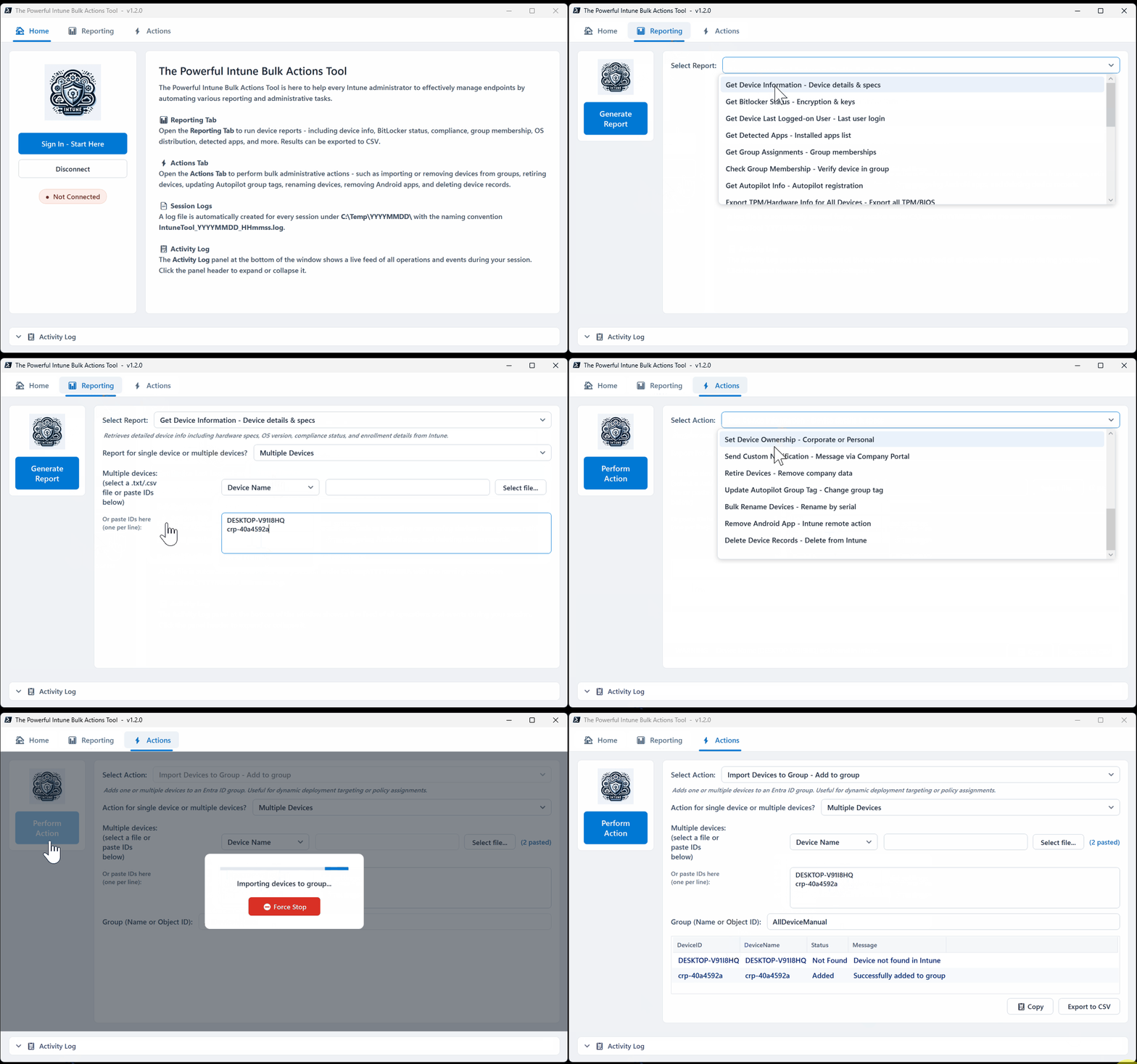
Table of Contents
What it is and why it is called the Powerful Intune Bulk Actions Tool
It’s a graphical PowerShell app that connects to Microsoft Graph and gives you a proper interface for bulk device management. Instead of remembering Microsoft Graph endpoints or maintaining your own scripts, you pick an action or a report, feed it a list of devices (by Intune Device ID, serial number, Entra ID, or device name), and let it run.
Every function works against a single device or a bulk list from a .txt file, so the same workflow scales from “fix this one laptop” to “give me a report for 300 devices” without switching tools.
Why I built it
Reporting and bulk actions are where most of the manual overhead in Intune administration actually lives. Nobody enjoys manually cross-referencing which devices are non-compliant, which ones have duplicate records because a serial number got re-enrolled, or which primary user assignments have drifted from the actual last logged-on user. Those are exactly the tasks that eat an afternoon and don’t need to.
I wanted something that handled the Microsoft Graph authentication, the beta endpoint quirks, and the module installation automatically, so the actual admin work (the reporting and the actions) is the only thing left to think about.
What it can report on
The reporting side is built for the questions you actually ask during day-to-day operations and cleanup projects:
- Core device info, BitLocker status, and last logged-on user
- Autopilot details, TPM/BIOS hardware info, and policy non-compliance
- OS and app version distribution across your fleet
- Group assignments and Intune group membership
- Every detected app across a device or device list
- Stale devices that haven’t checked in for X days, ready to feed straight into a retire or delete action
- Duplicate device records, with keep or cleanup suggestions when the same serial number shows up more than once
- Per-app install status across devices (installed, failed, pending)
- Low disk space devices, filtered by a free-GB threshold you set
- Primary user mismatches, so you can catch and fix them before they cause a support ticket
What it can do
The action side covers the bulk tasks that used to mean either a portal marathon or a custom script:
- Import or remove devices from Entra ID groups in bulk
- Sync (force check-in) and restart devices
- Rotate BitLocker recovery keys and LAPS passwords
- Remote lock lost or stolen devices, and trigger Defender quick or full scans
- Set primary user, device category, and ownership (Company or Personal)
- Send custom Company Portal notifications to iOS and Android devices
- Retire devices securely
- Update Autopilot group tags
- Bulk rename devices based on serial number
- Remove Android apps via Intune remote action
- Delete Intune, Autopilot, and Entra ID device records in one pass
That last one alone used to be three separate cleanup steps done manually. Now it’s one action.
Getting started
The tool is built on PowerShell 5.1+ and tested on PowerShell 7, VS Code’s integrated terminal, and the PowerShell ISE. On first run it checks for the required Microsoft Graph PowerShell submodules and installs whatever’s missing, without pulling in the full Microsoft.Graph meta-module. That alone cuts first-run setup from the 10 to 20 minutes the full SDK needs down to a couple of minutes.
Authentication is handled for you too. Connect through Microsoft Graph and the tool prompts for the exact permissions it needs on sign-in, no manual scope wrangling required. If you’d rather run it against your existing Microsoft Graph permissions without a new consent prompt, there’s a one-line change documented in the README.
The UI runs on WPF, which needs Single-Threaded Apartment mode. If you launch it from a plain PowerShell console (which defaults to MTA), it detects that and relaunches itself with -STA automatically, so you don’t need to remember the flag.
A note on beta Microsoft Graph endpoints
Worth flagging up front: several features, including Autopilot identities, non-compliance reports, detected apps, and group membership lookups, rely on the Microsoft Graph beta endpoint because the functionality isn’t in v1.0 yet. Microsoft can and does change beta endpoints without notice. If something that worked last month suddenly breaks, that’s the most likely cause, and I’d genuinely appreciate an issue on GitHub if you hit one.
Try it
The tool is free, open source under the MIT license, and available now:
The Powerful Intune Bulk Actions Tool on GitHub
Clone it, check the code if you’d like, run script.ps1, and see how much of your weekly manual actions it can knock out in one session. If you find a bug, hit a beta endpoint change, or have an action or report you’d like to see added, open an issue or send a pull request. It’s built to save real hours for real admins, and the best version of it is the one shaped by people actually using it.
Check also this interesting series about Azure Function and Intune Automation to further explore the numerous capabilities that we can build: Entra ID Dynamic Groups Can’t Query Installed Software (Here’s What To Do Instead), Azure Function Intune Automation: An interesting Cloud-Only Architecture, and Azure Function Intune Automation: a magnificent automation implemented.