

Bulk Restart Intune Devices – easy-peasy
In this short post we will explore how to bulk restart Intune devices using PowerShell and the Microsoft Graph API rebootNow action. Includes a production-ready script with multiple targeting modes, logging, and throttling protection
Sometimes you just need to restart a fleet of devices — right now. In practice, Windows devices don’t often need a bulk restart, but kiosk devices or similar ones may require one. The Intune Admin Center does allow you to restart devices one at a time, or use the Bulk Device Actions tab — although even there you still have to select devices individually. There is no easy way to do that based on a specific list of device IDs or serials.
That’s exactly where PowerShell and the Microsoft Graph API come in.
This post builds on two previous posts here on systunation — Waiting for 100 ages – Force restart and chill and 2 Easy Ways to Schedule Restart Notifications with Intune — and takes the restart story to its next logical step: bulk restart intune devices from the admin side using Graph API.
Table of Contents
How the Restart Actually Works
Before jumping into the script, it’s worth understanding the full chain of what happens when you trigger a remote restart.
The Graph API Endpoint
The remote restart is issued via the rebootNow action on the Graph API:
POST https://graph.microsoft.com/v1.0/deviceManagement/managedDevices/{managedDeviceId}/rebootNow
Key facts about this endpoint:
- No request body is required — it’s a pure POST action
- Returns HTTP 204 No Content on success
- Requires the permission:
DeviceManagementManagedDevices.PrivilegedOperations.All - Available on: v1.0 (stable) and beta
When Intune receives the POST, it queues the reboot command for delivery to the device via Windows Notification Services (WNS). The device must have an active connection to receive it.
Important: From my experience the restart happens almost instantly on Android, MacOS and iOS devices but required some time on Windows devices (considering the devices are online). Once a Windows device receives the command, it shows the user a notification and triggers the reboot within 5 minutes. If the device is offline at the time of the API call, the action will be delivered on the next Intune sync cycle — which can be up to 10–30 minutes after the device comes online.
Script Overview
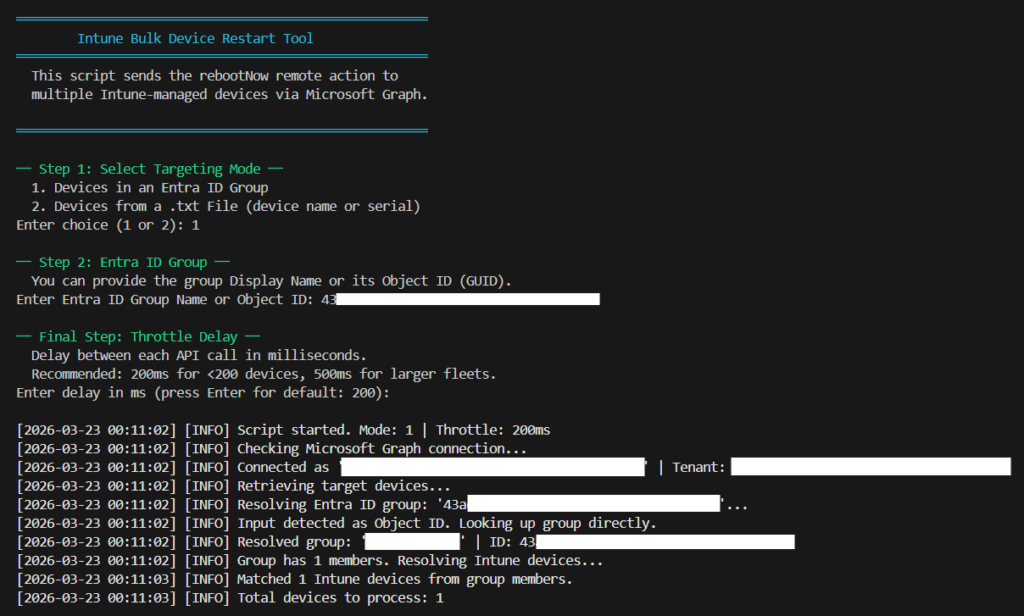
The Intune Bulk Restart Tool is an interactive PowerShell script that:
- Connects to Microsoft Graph using
Connect-MgGraph - Lets you choose from two targeting modes
- Sends the
rebootNowaction to each target device via Graph API - Applies a configurable delay between requests to avoid Graph throttling
- Logs every action with timestamps to a
.logfile - Displays real-time progress and a final summary
Targeting Modes
The script supports two modes so you can control exactly which devices get restarted:
Mode 1 — Devices in an Entra ID Group Targets all Intune-managed devices that are members of a specific Entra ID group. You can provide either the group’s Display Name or its Object ID. This is the recommended mode for controlled restarts — your existing Intune assignment groups map directly to this.
Mode 2 — Devices from a .txt File Reads Intune device IDs or serial numbers from a plain text file and restarts only those devices. Ideal for incident response or kiosk fleet maintenance.
Throttling and Rate Limiting
When targeting hundreds of devices, you need to be careful about the Graph API’s throttling limits. The script includes a configurable delay (default: 200ms) between each reboot request. This is a practical safeguard — the Graph API for Intune device actions can return HTTP 429 Too Many Requests under load.
The script automatically detects a 429 response and retries after waiting for the Retry-After period returned in the response headers.
Logging and Auditing
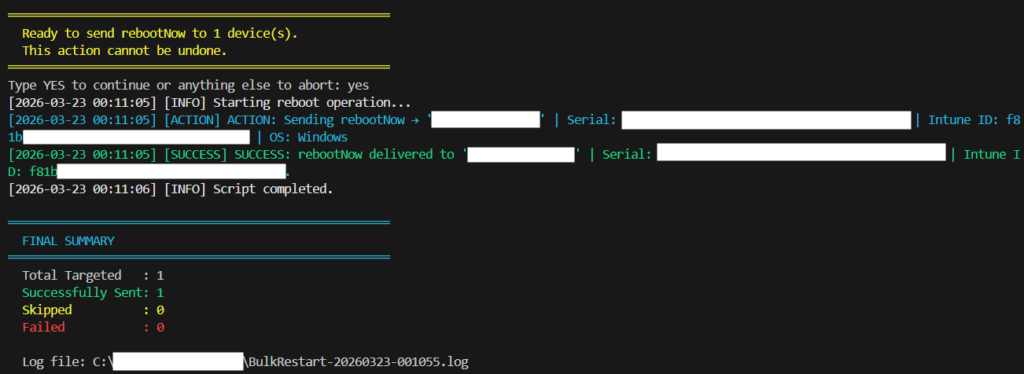
Every action is written to a timestamped .log file:
- Device ID and name
- Restart result: Success / Skipped / Failed
- Error message if the action failed
- Timestamp for each event
A final summary is printed at the end of the run showing total processed, succeeded, skipped, and failed counts.
Permissions Required
| Permission | Type | Purpose |
|---|---|---|
DeviceManagementManagedDevices.PrivilegedOperations.All | Delegated / Application | Required to trigger the rebootNow action |
DeviceManagementManagedDevices.Read.All | Delegated / Application | Required to enumerate devices |
GroupMember.Read.All | Delegated / Application | Required for Mode 1 (Entra ID group targeting) |
Authentication is handled by Connect-MgGraph. The script verifies an active session before proceeding.
The Script
You can also find the script in my GitHub repo.
Always test on a small group of devices before targeting more devices. A bulk restart is a disruptive action — plan a maintenance window where needed.
<#
.SYNOPSIS
    Intune Bulk Device Restart Tool — uses Microsoft Graph API rebootNow action.

.DESCRIPTION
    Interactive PowerShell script to restart Intune-managed devices in bulk.
    Supports two targeting modes:
      1. Devices in a specific Entra ID group (by Display Name or Object ID)
      2. Devices from a .txt file (by device name or serial number)

    Includes throttle protection, retry logic, full logging, and a final summary.

.NOTES
    Required Graph Permissions:
      - DeviceManagementManagedDevices.PrivilegedOperations.All
      - DeviceManagementManagedDevices.Read.All
      - GroupMember.Read.All
      - Device.Read.All
#>

#region ── Helper Functions ──────────────────────────────────────────────────

function Show-WelcomeMessage {
    Write-Host ""
    Write-Host "══════════════════════════════════════════════════════" -ForegroundColor Cyan
    Write-Host "        Intune Bulk Device Restart Tool               " -ForegroundColor Cyan
    Write-Host "══════════════════════════════════════════════════════" -ForegroundColor Cyan
    Write-Host "  This script sends the rebootNow remote action to"
    Write-Host "  multiple Intune-managed devices via Microsoft Graph."
    Write-Host ""
    Write-Host "══════════════════════════════════════════════════════" -ForegroundColor Cyan
    Write-Host ""
}

function Get-TargetingMode {
    Write-Host "── Step 1: Select Targeting Mode ──" -ForegroundColor Green
    Write-Host "  1. Devices in an Entra ID Group"
    Write-Host "  2. Devices from a .txt File (device name or serial)"
    do {
        $choice = Read-Host "Enter choice (1 or 2)"
        if ($choice -notin '1','2') {
            Write-Host "Invalid choice. Please enter 1 or 2." -ForegroundColor Red
        }
    } while ($choice -notin '1','2')
    return $choice
}

function Get-GroupIdentifier {
    Write-Host ""
    Write-Host "── Step 2: Entra ID Group ──" -ForegroundColor Green
    Write-Host "  You can provide the group Display Name or its Object ID (GUID)."
    do {
        $groupInput = Read-Host "Enter Entra ID Group Name or Object ID"
        if ([string]::IsNullOrWhiteSpace($groupInput)) {
            Write-Host "Group name/ID cannot be empty." -ForegroundColor Red
        }
    } while ([string]::IsNullOrWhiteSpace($groupInput))
    return $groupInput
}

function Get-DeviceListFile {
    Write-Host ""
    Write-Host "── Step 2a: Device List File ──" -ForegroundColor Green
    do {
        $filePath = Read-Host "Enter full path to .txt file (one identifier per line)"
        if (-not (Test-Path -Path $filePath -PathType Leaf)) {
            Write-Host "File not found: $filePath" -ForegroundColor Red
            $filePath = $null
        } elseif ($filePath -notlike '*.txt') {
            Write-Host "File must be a .txt file." -ForegroundColor Red
            $filePath = $null
        }
    } while (-not $filePath)
    return $filePath
}

function Get-FileIdentifierType {
    Write-Host ""
    Write-Host "── Step 2b: What identifiers are in the file? ──" -ForegroundColor Green
    Write-Host "  1. Serial Numbers"
    Write-Host "  2. Intune Device IDs"
    do {
        $choice = Read-Host "Enter choice (1 or 2)"
        if ($choice -notin '1','2') {
            Write-Host "Invalid choice. Please enter 1 or 2." -ForegroundColor Red
        }
    } while ($choice -notin '1','2')
    return $choice
}

function Get-ThrottleDelay {
    Write-Host ""
    Write-Host "── Final Step: Throttle Delay ──" -ForegroundColor Green
    Write-Host "  Delay between each API call in milliseconds."
    Write-Host "  Recommended: 200ms for <200 devices, 500ms for larger fleets."
    $delayInput = Read-Host "Enter delay in ms (press Enter for default: 200)"
    if ([string]::IsNullOrWhiteSpace($delayInput) -or $delayInput -notmatch '^\d+$') {
        return 200
    }
    return [int]$delayInput
}

# ── Logging ──────────────────────────────────────────────────────────────────
$Script:LogFile = "C:\Temp\BulkRestart-$(Get-Date -Format 'yyyyMMdd-HHmmss').log"

function Write-Log {
    param(
        [string]$Message,
        [ValidateSet('INFO','WARN','ERROR','SUCCESS','ACTION','FATAL')]
        [string]$Level = 'INFO'
    )
    $entry = "[$(Get-Date -Format 'yyyy-MM-dd HH:mm:ss')] [$Level] $Message"
    $entry | Out-File -FilePath $Script:LogFile -Append

    $color = switch ($Level) {
        'SUCCESS' { 'Green'   }
        'WARN'    { 'Yellow'  }
        'ERROR'   { 'Red'     }
        'FATAL'   { 'Red'     }
        'ACTION'  { 'Cyan'    }
        default   { 'White'   }
    }
    Write-Host $entry -ForegroundColor $color
}

# ── Device Retrieval Functions ────────────────────────────────────────────────

function Get-DevicesFromGroup {
    param([string]$GroupInput)

    Write-Log "Resolving Entra ID group: '$GroupInput'..."

    $group = $null
    # Determine if input is a GUID (Object ID) or a display name
    if ($GroupInput -match '^[0-9a-fA-F]{8}-([0-9a-fA-F]{4}-){3}[0-9a-fA-F]{12}$') {
        Write-Log "Input detected as Object ID. Looking up group directly."
        try {
            # Explicitly request Id and DisplayName — newer SDK versions don't return all properties by default
            $group = Get-MgGroup -GroupId $GroupInput -Property "Id,DisplayName" -ErrorAction Stop
        } catch {
            Write-Log "No group found with Object ID '$GroupInput'." -Level ERROR
            throw
        }
    } else {
        Write-Log "Input detected as Display Name. Searching..."
        try {
            # ConsistencyLevel + CountVariable required for $filter queries in newer SDK versions
            $groups = Get-MgGroup -Filter "displayName eq '$GroupInput'" `
                                  -Property "Id,DisplayName" `
                                  -ConsistencyLevel "eventual" `
                                  -CountVariable groupCount `
                                  -ErrorAction Stop

            if (-not $groups -or @($groups).Count -eq 0) {
                Write-Log "No group found with name '$GroupInput'." -Level ERROR
                throw "Group not found."
            }
            if (@($groups).Count -gt 1) {
                Write-Log "Multiple groups match '$GroupInput'. Please use the Object ID instead." -Level WARN
                throw "Ambiguous group name."
            }
            $group = @($groups)[0]
        } catch {
            Write-Log "Error searching for group: $($_.Exception.Message)" -Level ERROR
            throw
        }
    }

    # Guard: ensure Id was actually returned before proceeding
    if ([string]::IsNullOrWhiteSpace($group.Id)) {
        Write-Log "Group object resolved but Id is empty. Check Graph permissions or try using the Object ID directly." -Level ERROR
        throw "Group Id is empty after resolution."
    }

    Write-Log "Resolved group: '$($group.DisplayName)' | ID: $($group.Id)"

    try {
        $members = Get-MgGroupMember -GroupId $group.Id -All -ErrorAction Stop
        Write-Log "Group has $($members.Count) members. Resolving Intune devices..."
    } catch {
        Write-Log "Failed to retrieve group members: $($_.Exception.Message)" -Level ERROR
        throw
    }

    # Build a lookup table: Entra DeviceId (azureAdDeviceId) → Intune device object
    # NOTE: AzureAdDeviceId in Intune = the 'deviceId' property on the Entra device object.
    #       This is NOT the same as the Entra Object ID returned by Get-MgGroupMember.
    $allIntuneDevices = Get-MgDeviceManagementManagedDevice -All
    $deviceIdLookup = @{}
    foreach ($d in $allIntuneDevices) {
        if ($d.AzureAdDeviceId) {
            $deviceIdLookup[$d.AzureAdDeviceId.ToLower()] = $d
        }
    }

    $matchedDevices = @()
    foreach ($member in $members) {
        try {
            # $member.Id is the Entra Object ID of the device.
            # We use Invoke-MgGraphRequest (already loaded, no extra module required) to retrieve
            # the 'deviceId' property — the Azure AD Device ID — which Intune stores as AzureAdDeviceId.
            # These two GUIDs are different and must not be confused.
            $uri = "https://graph.microsoft.com/v1.0/devices/$($member.Id)?`$select=deviceId,displayName"
            $entraDevice = Invoke-MgGraphRequest -Method GET -Uri $uri -ErrorAction Stop

            $azureAdDeviceId = $entraDevice.deviceId.ToLower()

            $intuneDevice = $deviceIdLookup[$azureAdDeviceId]
            if ($intuneDevice) {
                $matchedDevices += $intuneDevice
            } else {
                Write-Log "Entra device '$($entraDevice.displayName)' (DeviceId: $azureAdDeviceId) is in the group but has no matching Intune managed device." -Level WARN
            }
        } catch {
            Write-Log "Could not resolve Entra device for member Object ID '$($member.Id)': $($_.Exception.Message)" -Level WARN
        }
    }

    Write-Log "Matched $($matchedDevices.Count) Intune devices from group members."
    return $matchedDevices
}

function Get-DevicesFromFile {
    param(
        [string]$FilePath,
        [ValidateSet('Serial','IntuneID')]
        [string]$FileType
    )

    Write-Log "Reading device identifiers from file: '$FilePath' (Type: $FileType)..."
    $identifiers = Get-Content -Path $FilePath |
                   Where-Object { -not [string]::IsNullOrWhiteSpace($_) } |
                   ForEach-Object { $_.Trim() }
    Write-Log "Found $($identifiers.Count) identifiers in file."

    $allIntuneDevices = Get-MgDeviceManagementManagedDevice -All
    $matched = @()

    foreach ($id in $identifiers) {
        $device = $null

        if ($FileType -eq 'Serial') {
            # Strict serial number lookup only
            $device = $allIntuneDevices | Where-Object { $_.SerialNumber -eq $id }
        } else {
            # Strict Intune Device ID (managed device Id) lookup only
            $device = $allIntuneDevices | Where-Object { $_.Id -eq $id }
        }

        if ($device) {
            $matched += $device
        } else {
            Write-Log "No Intune device found for $FileType '$id'." -Level WARN
        }
    }

    Write-Log "Matched $($matched.Count) Intune devices from file."
    return $matched
}

# ── Restart Function ──────────────────────────────────────────────────────────

function Invoke-DeviceRebootNow {
    param(
        [string]$DeviceId,
        [string]$DeviceName,
        [int]$MaxRetries = 3
    )

    $uri = "https://graph.microsoft.com/v1.0/deviceManagement/managedDevices('$DeviceId')/rebootNow"
    $attempt = 0

    while ($attempt -lt $MaxRetries) {
        $attempt++
        try {
            $response = Invoke-MgGraphRequest -Method POST -Uri $uri -ErrorAction Stop
            # 204 No Content = success
            return @{ Success = $true; Message = "OK" }
        } catch {
            $statusCode = $null
            $retryAfter = 30

            # Extract HTTP status code from the exception
            if ($_.Exception.Response) {
                $statusCode = [int]$_.Exception.Response.StatusCode
            }

            # Handle 429 throttling
            if ($statusCode -eq 429) {
                try {
                    $retryAfter = [int]$_.Exception.Response.Headers["Retry-After"]
                } catch { $retryAfter = 30 }

                Write-Log "THROTTLED on device '$DeviceName'. Waiting $retryAfter seconds before retry (attempt $attempt/$MaxRetries)..." -Level WARN
                Start-Sleep -Seconds $retryAfter
                continue
            }

            # Any other error
            $errorMsg = $_.ErrorDetails.Message
            if ([string]::IsNullOrEmpty($errorMsg)) { $errorMsg = $_.Exception.Message }

            if ($attempt -ge $MaxRetries) {
                return @{ Success = $false; Message = $errorMsg }
            }

            Write-Log "Error on attempt $attempt for '$DeviceName': $errorMsg. Retrying..." -Level WARN
            Start-Sleep -Seconds 5
        }
    }
    return @{ Success = $false; Message = "Max retries exceeded." }
}

#endregion

#region ── Main Script ───────────────────────────────────────────────────────

$summary = @{ Total = 0; Success = 0; Skipped = 0; Failed = 0 }

Show-WelcomeMessage

# ── Collect User Input ───────────────────────────────────────────────────────
$mode = Get-TargetingMode

$groupInput = $null
$deviceFile = $null
$fileType   = $null

switch ($mode) {
    '1' {
        $groupInput = Get-GroupIdentifier
    }
    '2' {
        $deviceFile = Get-DeviceListFile
        $fileTypeChoice = Get-FileIdentifierType
        $fileType = if ($fileTypeChoice -eq '1') { 'Serial' } else { 'IntuneID' }
    }
}

$throttleMs = Get-ThrottleDelay

Write-Host ""
Write-Log "Script started. Mode: $mode | Throttle: ${throttleMs}ms"

# ── Graph Authentication ─────────────────────────────────────────────────────
Write-Log "Checking Microsoft Graph connection..."
try {
    $ctx = Get-MgContext
    if (-not $ctx) {
        Write-Log "No active Graph session. Connecting..." -Level WARN
        $requiredScopes = @(
            "DeviceManagementManagedDevices.PrivilegedOperations.All",
            "DeviceManagementManagedDevices.Read.All",
            "GroupMember.Read.All",
            "Device.Read.All"
        )
        Connect-MgGraph -Scopes $requiredScopes -ErrorAction Stop
        $ctx = Get-MgContext
    }
    Write-Log "Connected as '$($ctx.Account)' | Tenant: $($ctx.TenantId)"
} catch {
    Write-Log "Authentication failed: $($_.Exception.Message)" -Level FATAL
    exit 1
}

# ── Retrieve Target Devices ──────────────────────────────────────────────────
Write-Log "Retrieving target devices..."
$targetDevices = @()

try {
    switch ($mode) {
        '1' { $targetDevices = Get-DevicesFromGroup -GroupInput $groupInput }
        '2' { $targetDevices = Get-DevicesFromFile  -FilePath $deviceFile -FileType $fileType }
    }
} catch {
    Write-Log "Failed to retrieve target devices. Exiting." -Level FATAL
    exit 1
}

if ($targetDevices.Count -eq 0) {
    Write-Log "No devices matched the selected criteria. Nothing to do." -Level WARN
    exit 0
}

$summary.Total = $targetDevices.Count
Write-Log "Total devices to process: $($summary.Total)"

# ── Confirm Before Proceeding ────────────────────────────────────────────────
Write-Host ""
Write-Host "══════════════════════════════════════════════════════" -ForegroundColor Yellow
Write-Host "  Ready to send rebootNow to $($summary.Total) device(s)." -ForegroundColor Yellow
Write-Host "  This action cannot be undone." -ForegroundColor Yellow
Write-Host "══════════════════════════════════════════════════════" -ForegroundColor Yellow
$confirm = Read-Host "Type YES to continue or anything else to abort"
if ($confirm -ne 'YES') {
    Write-Log "User aborted the operation." -Level WARN
    exit 0
}

# ── Process Each Device ──────────────────────────────────────────────────────
Write-Log "Starting reboot operation..."
$progressCount = 0

foreach ($device in $targetDevices) {
    $progressCount++
    $deviceId   = $device.Id
    $deviceName = $device.DeviceName
    $osType     = $device.OperatingSystem
    $serial     = $device.SerialNumber

    Write-Progress -Activity "Sending rebootNow to Intune Devices" `
                   -Status "Processing $progressCount of $($summary.Total): $deviceName" `
                   -PercentComplete (($progressCount / $summary.Total) * 100)

    # Basic validation
    if ([string]::IsNullOrWhiteSpace($deviceId)) {
        Write-Log "SKIPPED: '$deviceName' (Serial: $serial) has no Intune Device ID." -Level WARN
        $summary.Skipped++
        continue
    }

    Write-Log "ACTION: Sending rebootNow → '$deviceName' | Serial: $serial | Intune ID: $deviceId | OS: $osType" -Level ACTION

    $result = Invoke-DeviceRebootNow -DeviceId $deviceId -DeviceName $deviceName

    if ($result.Success) {
        Write-Log "SUCCESS: rebootNow delivered to '$deviceName' | Serial: $serial | Intune ID: $deviceId." -Level SUCCESS
        $summary.Success++
    } else {
        Write-Log "FAILED: '$deviceName' | Serial: $serial | Intune ID: $deviceId | Reason: $($result.Message)" -Level ERROR
        $summary.Failed++
    }

    # Throttle between requests
    if ($throttleMs -gt 0) {
        Start-Sleep -Milliseconds $throttleMs
    }
}

# ── Final Summary ─────────────────────────────────────────────────────────────
Write-Progress -Activity "Sending rebootNow to Intune Devices" -Completed
Write-Log "Script completed."
Write-Host ""
Write-Host "══════════════════════════════════════════════════════" -ForegroundColor Cyan
Write-Host "  FINAL SUMMARY" -ForegroundColor Cyan
Write-Host "══════════════════════════════════════════════════════" -ForegroundColor Cyan
Write-Host "  Total Targeted   : $($summary.Total)"
Write-Host "  Successfully Sent: $($summary.Success)" -ForegroundColor Green
Write-Host "  Skipped          : $($summary.Skipped)" -ForegroundColor Yellow
Write-Host "  Failed           : $($summary.Failed)"  -ForegroundColor Red
Write-Host ""
Write-Host "  Log file: $Script:LogFile"
Write-Host "══════════════════════════════════════════════════════" -ForegroundColor Cyan

#endregion
A Note on Timing
One thing admins often misunderstand: the API call succeeding does not mean the device has rebooted. It means Intune has accepted the command. The actual restart requires:
- The device to be online and syncing with Intune
- WNS (Windows Notification Services) to deliver the push notification
- The MDM client on the device to process the
rebootNowCSP command - The OS to initiate the restart sequence (~5 minute window)
If devices are offline at the time of the command, the action will be retried on the next sync cycle. You can monitor the Device Action status in the Intune portal under each device’s Remote Actions history.
To verify restarts programmatically after the fact, you can query lastSyncDateTime and cross-reference it with the action timestamp — a follow-up script idea for another post!
Conclusion
The Intune portal’s one-at-a-time restart limitation is not a blocker when you have PowerShell and Graph API in your toolkit. The script in this post gives you a safe, controlled, and auditable way to bulk restart Intune devices across your fleet — whether you’re targeting all corporate devices or a specific list of machines from a file.
Use it with care. Bulk restarts are powerful, and user disruption is real. But in the right scenarios — patch compliance, incident response, or post-configuration reboots — this is exactly the kind of automation that makes modern device management scale.
References and Documentation
- rebootNow action — Microsoft Graph v1.0
- Remote Device Action: Restart — Microsoft Intune
- Reboot CSP — Microsoft Learn
- Invoke-MgGraphRequest
- Get-MgDeviceManagementManagedDevice
Other Interesting Posts